Blog · · 5min read
WhatsApp or SMS for appointment reminders: what each costs and when to use which
SMS always arrives and has cost the same for years. WhatsApp is cheaper and gets read more, but it has rules. And there's a fourth channel that costs nothing.
A reminder the day before cuts no-shows more than anything else you can do. You already know that. The question businesses ask us when they start with Calendace is a different one: which channel. And the short answer is that there is no channel that’s good for everything. Each has a cost, a read rate and its own limits, and the sensible thing is to combine them.
SMS: the one that always arrives
SMS has one virtue no other channel matches: it reaches any phone, without the client installing anything or accepting anything. It doesn’t need data, it doesn’t depend on them having space on their phone, and it doesn’t land in a spam folder.
In exchange, it’s the most expensive per message. In Spain, an SMS to a domestic mobile costs between 7 and 9 cents depending on the provider, and that price has barely moved in a decade. For a salon sending 400 reminders a month that’s about €30 a month. Not a fortune, but it’s the channel where every message shows up on the bill.
It has another limit that people forget until it bites: 160 characters, and no accents if you don’t want the message split in two and charged twice. That’s why SMS reminders are short and unaccented, and why the link they carry has to be short too.
WhatsApp: cheaper, more read, with rules
WhatsApp gets read. The open rate of a WhatsApp message is far above that of SMS and email, and the client can tap a button to cancel or confirm without leaving the chat.
Per message it’s cheaper than SMS, generally a fraction. But it works under rules you should know before betting everything on it:
- Approved templates only. A business can’t send just any text to a client on WhatsApp. Each type of message (reminder, confirmation, cancellation) is a template that Meta reviews and approves before it can be used. With Calendace this is already done: the templates are approved and have been in use for over a year.
- The client can block you. If someone marks your messages as spam, they stop getting them. With reminders for appointments they asked for themselves this rarely happens, but it’s a reason not to use the channel for anything they didn’t ask for.
- It needs WhatsApp installed. Almost everyone has it, but not everyone. For that client, the reminder has to go out another way.
Email: free, but read whenever it’s read
Email costs nothing and has no character limit. It’s the perfect channel for what isn’t urgent: the booking confirmation with all the details and the map, or the review request the next day.
For tomorrow’s reminder it’s weaker. Many clients check email once a day or less, and a reminder for a ten o’clock appointment read at eleven the night before is useful, but one read at noon the next day isn’t. That’s why at Calendace email is included on every plan and is the base channel, but we don’t recommend it as the only one for the reminder.
The fourth channel: the app notification
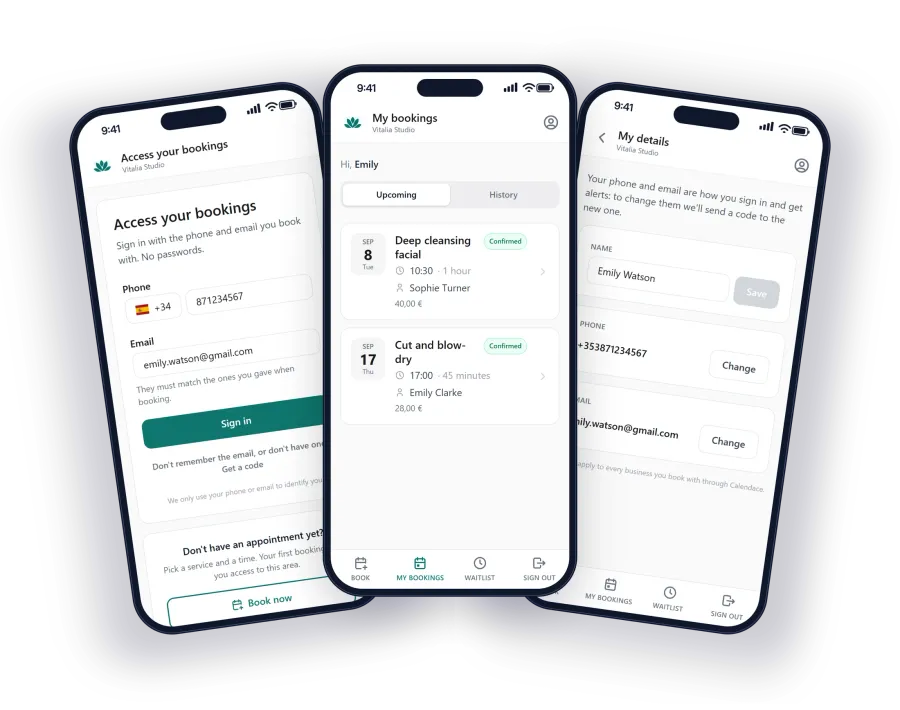
There’s one more channel, and it’s the newest: the notification on the phone. If the client has your booking page installed as an app on their home screen, your alerts reach them like those of any other app. No per-message fee, no character limit and no templates to approve.
The only condition is that the client has installed it and accepted notifications, which the page itself proposes the first time they open it on a phone. For repeat clients, which is most of them in a salon, it’s the cheapest option and the most read. We explain how it works on the app for your clients page.
Which combination to use
Our recommendation, after seeing how businesses that have been with us for a while set it up:
- Email always. It’s free and keeps a record of everything. The confirmation with the details goes here.
- App notification for whoever has it. It’s free and arrives instantly. Once part of your clientele has the page installed, it’s the channel that delivers the most reminders at no cost.
- WhatsApp for the day-before reminder. It’s the most read and the one that lets them cancel with a button. It costs credits, but every cancellation you get in time is worth more than the message.
- SMS as a safety net. For clients without WhatsApp, or when you want to be absolutely sure the alert lands, as with a waitlist slot that has to be filled within the hour.
In Calendace you choose channel by channel and alert by alert: you can send the confirmation by email only, the reminder by WhatsApp and notification, and the free-slot alert through all of them. If you tick several channels, all of them are sent; none is conditional on another.
The maths worth doing
A well-delivered reminder prevents one no-show in five or six, depending on the sector. In a salon with 400 appointments a month and a 10% no-show rate, that’s 40 no-shows. If the reminder prevents eight of them, at €25 on average, that’s €200 a month recovered. Against about €30 of SMS, considerably less of WhatsApp, and zero for email and notifications.
Put another way: the most expensive channel pays for itself with the first no-show it prevents. The real discussion isn’t whether to send reminders, but how many channels to combine so that none of them goes unread.