Blog · · 5min read
How to ask for Google reviews after the appointment without being a pest
When to send the request, what text to use, who not to ask, how to answer a bad review, and how the automatic request in Calendace fits in when the appointment ends.
A salon with 4.8 stars and 140 Google reviews doesn’t have them because its clients are more grateful than yours. It has them because it asks, everyone, every time, and because it asks in a way that doesn’t get on anyone’s nerves. The difference between a business with 12 reviews and one with 140 is almost never the quality of the work: one asks and the other waits.
At the same time, asking badly is worse than not asking. The request at the front desk, while the client is getting their card out, makes everyone uncomfortable. The two-paragraph message the next day doesn’t get read. And the one that arrives every single visit ends up muted.
When to ask
The good window is short: between the client walking out of the door and that same evening. They are still looking in the mirror, still feeling like they’ve just come out. The next day it’s a memory; a week later, a favour.
Within that window, an hour or two after is better than the very same moment. A message that lands before the client has reached the car feels like a machine, because it is one. One that lands mid-afternoon feels like a nice touch.
Don’t send it at night. And don’t mix it in with the admin messages: booking, reminder and cancellation are one thing; asking for something is another.
What text to use
Short, with their name, and with a direct link to write the review, not to the business listing. Every tap you save the client is reviews you gain.
By WhatsApp or app notification:
Hi Martha, thanks for coming in today to Vega Salon. If you have a minute, a Google review would help us a lot: [link]. We read every one.
By email, subject “How did it go today at Vega Salon?” with the same body and one more line: “If anything wasn’t right, reply to this email and we’ll sort it”. That line steers a share of the complaints towards you that would otherwise end up on Google.
What it shouldn’t carry: “five stars”. Asking for a specific score is asking too much, and Google doesn’t like it. Nor “help us grow” or “you are very important to us”. The client knows what a review is for; there’s nothing to sell.
And don’t nag. Someone who has already written one and keeps getting requests learns to ignore your messages, and that costs you the reminders too. If the request goes out automatically after every appointment, keep it short and send it through a channel that’s easy to ignore without irritation, like email.
Who not to ask
Two filters: one about the rules, one about common sense.
The rules: Google’s policies forbid asking only the clients you know are happy and not the rest, and forbid offering discounts or gifts in exchange. So the rule is ask everyone or don’t ask. What you can choose is when and how.
Common sense:
- Someone who had a problem you haven’t fixed yet. Fix first, ask later. If the fix goes well, that client is often the one who leaves the best review.
- Someone who comes for something private. If you are a psychologist, a therapist or work in physiotherapy, a public review says something about the client they may not want to share. In these sectors it’s more sensible not to automate the request and to accept it only from those who offer.
- Someone who has already left one. Obvious, but it happens with any system that doesn’t keep track. Note it on the client’s record.
- The passing client who won’t be back. Not out of principle: they won’t write it, and the message is just noise.
What to do with a bad review
It will come. With 100 reviews, the odd two-star one is statistics, not failure. What does get judged is the reply, and the person who reads it isn’t the one who wrote the review: it’s the next fifty clients deciding whether to walk in.
Reply within 24 or 48 hours, not within five minutes. Keep it short: thank them, acknowledge the specific thing they mention, offer to continue in private. No arguing, no explaining your version point by point, no “we’re sorry you feel that way”. Three lines:
Thanks for letting us know, Anna. We’re sorry the colour didn’t turn out as you expected; that’s not usual for us and we’d like to put it right. Call us on [phone] and we’ll sort it at no cost.
If the review is fake or from someone who never came, you can report it to Google, but it takes time and doesn’t always work. In the meantime, the polite reply is still what everyone else sees.
And the best defence against a bad review is having lots of good ones. With 12 reviews, a one-star review drops your average by nearly half a point. With 140, it moves it by a few hundredths.
How the automatic request in Calendace fits in
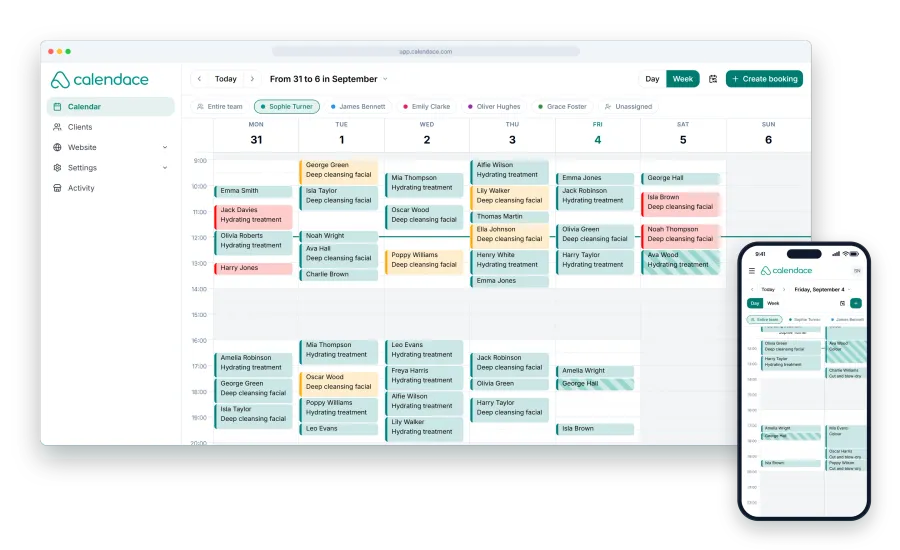
Of the seven automatic notifications in Calendace, the last one is the Google review request when the appointment ends. It goes out through the channels you tick (email, SMS, WhatsApp or app notification) once the appointment is over, with the link to your Google listing. Nothing to remember, nothing to write.
What stays in your hands:
- Turning it on or not, depending on your sector. In a hair salon, on. In a psychology practice, probably not.
- The channel. Email is free and enough for this: it isn’t urgent like a reminder, and it’s the channel that bothers people least if it goes out after every appointment. If your clients have your page installed as an app, the notification is free too and gets seen more.
- Reading what comes in. The automatic request brings reviews; answering them is still a job for people.
If you don’t ask for reviews today, the cheapest way to start is to switch this notification on, email only, and count in a month how many have come in. It’s usually the number that changes most in a small business for the least effort.