Blog · · 6min read
Where to put your booking link: Instagram, Google, WhatsApp and email
Your booking page is useless if the client doesn't have it in front of them the moment they decide to book. Exactly where to place the link, with what wording, and how to tell whether it's working.
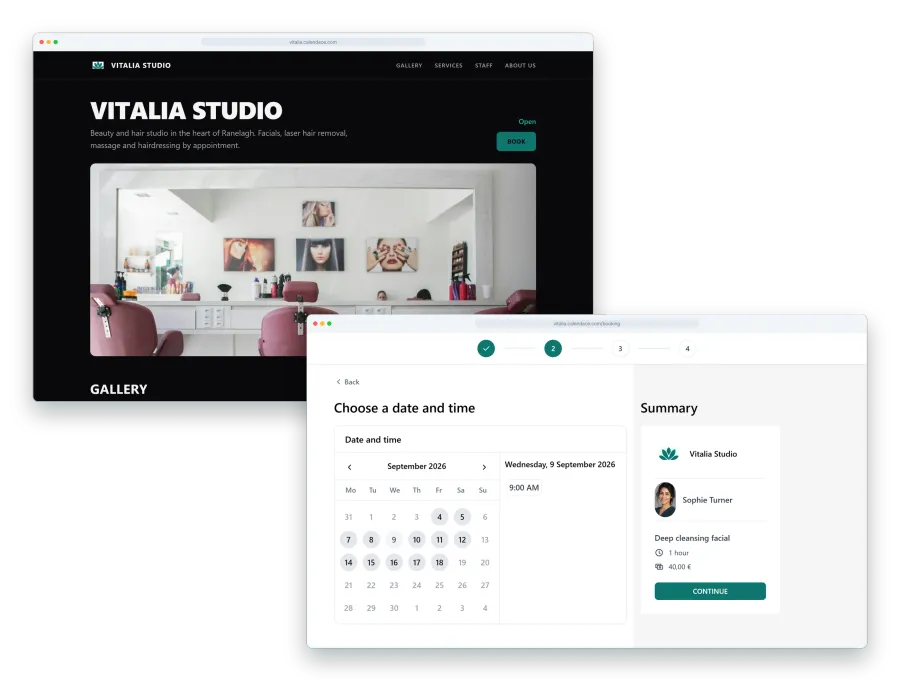
Your booking page is done: services, prices, hours, photos. And half of your appointments still come in by phone, or as a “hi, anything free on Thursday?” on WhatsApp that someone has to answer by hand. The problem is rarely the page. It’s that the client doesn’t have it in front of them at the moment they decide to book.
That moment doesn’t happen on your website. It happens on Instagram at eleven at night looking at a photo of a haircut, on Google when they search “barber near me” before leaving the house, or in the WhatsApp chat where they messaged you last time. The link has to be in those three places, and in each one in a specific way.
One link, always the same one
Calendace gives you an address for your booking page and a QR code that points to it. Use that same address everywhere. Don’t make a different short link for each network, and don’t link to your website so the client can hunt for the booking button from there: every extra click is a share of people who don’t make it.
The page detects the visitor’s language and shows itself in theirs, so the same link works for the regular you’ve had for years and for the tourist who finds you on Google Maps.
Instagram: bio, stories and a pinned highlight
On Instagram the link goes in three places, and all three count.
The bio. Put the link in the website field and, in the line of text above it, say what it does: “Book an appointment at the link below”. A bare link with no explanation gets mistaken for the business website and nobody taps it to book.
Stories. Every time you post a finished piece of work, add the link sticker with the word “Book”. The photo of the result is the moment of peak interest; the sticker turns that interest into an appointment without leaving the app. A salon that posts three or four stories a week has three or four booking opportunities it is currently wasting.
A pinned highlight. Create a highlight called “Bookings” with a single story: the link and one sentence. That way whoever lands on your profile on a Tuesday with no live stories still has somewhere to tap.
The “Book” action button that Instagram offers business accounts only works with a handful of Meta partner platforms. You don’t need it: the bio and the sticker do the same job.
Google: the booking button on your listing
When someone searches for your business on Google or Maps, they see your Business Profile listing: hours, reviews, photos. That listing accepts a booking link that shows up as a “Book” or “Book an appointment” button right in the results.
You add it from your Business Profile, in the business information editor, under the bookings or appointments section. Paste your Calendace link and within a few days it appears on the listing. It is probably the highest-intent spot of all: whoever gets there has already searched for you by name or by trade.
If your listing isn’t claimed yet, do that before anything else. Calendace doesn’t bring you new clients; Google does, and the link on the listing is what turns that visit into an appointment without going through the phone.
WhatsApp Business: let the link do the answering
WhatsApp is where most appointments get requested and where most time gets lost replying. Two WhatsApp Business features fix it almost on their own.
The greeting message. It goes out automatically to anyone messaging you for the first time or after a while without contact. Put the link in it:
Hi, thanks for messaging Lorca Hair. To book, pick a day and time here: [link]. If there’s no slot, join the waitlist from the same link and we’ll let you know when one opens up.
A quick reply. Create the shortcut “/book” with the same text. When someone asks “anything on Thursday?”, you type /book, send, and the client picks for themselves while you carry on working. If you have the waitlist switched on, the last sentence saves you the follow-up “and if something frees up?”.
The away message, the one that goes out outside opening hours, should carry exactly the same link. That’s when the most people write and when you can least reply.
Email signature and the rest
In your email signature, one line: “Book an appointment: [link]”. It goes on every quote, every reply and every invoice you send. It takes a minute and stays there for good.
And in the shop, the QR code. It’s the same link in a printable format, and its place is the counter and the mirror, so the client books their next appointment before they leave. We cover that in the article on the QR code at the counter.
How to tell where each booking comes from
Here it pays to be honest: Calendace doesn’t tell you which network each booking came from. What you can do is measure it yourself with two cheap methods.
Count before and after. Say the week before you added the link to your Google listing you were getting 30 online bookings. The following week, 42. The difference isn’t an exact figure, but it tells you whether that spot moves anything. Do it one at a time: Google first, Instagram two weeks later, and you learn what each one contributes. On the Premium plan, the appointments-per-week statistics give you that count without tallying by hand.
Ask the new client. The first time someone comes in, “how did you find us?” is a normal question. Write the answer in the private notes on their client record. After a month, with twenty records, you know where your new clients come from with a tolerable margin of error.
Checklist
- The Calendace link is in your Instagram bio with a line saying what it’s for.
- There is a “Bookings” highlight with the link.
- Stories of finished work carry the link sticker.
- Your Google listing has the link in the bookings section.
- WhatsApp Business has a greeting message, an away message and a /book quick reply with the link.
- Your email signature carries the link.
- The QR code is printed and on the counter.
When all seven are done, “anything on Thursday?” will keep arriving. But less and less often, and the reply will cost you a slash and four letters.