Blog · · 6min read
Appointment reminders for psychologists: how to remind without saying what the appointment is for
A reminder that says "therapy session" on the lock screen of a shared phone is a problem. What to put in the message, what to leave out, who it should come from, and why the cancellation deadline is part of the therapeutic frame.
A client tells you in the third session that their partner saw the appointment reminder on the lock screen of their phone. Nothing serious happened, but they had to give an explanation they didn’t want to give. And from then on, every message from you creates a little tension instead of helping them remember.
This is the specific problem with reminders in a psychology practice. In a hair salon the message can be as explicit as it likes; in your practice, the mere existence of the appointment is information the client may not have shared with anyone. And yet reminders are still needed: a missed session in therapy isn’t just an empty slot, it’s a week of work interrupted.
What follows is how to set up your messages so they remind without telling.
What to put in the reminder and what to leave out
The rule is simple: the reminder has to be enough for the client and not enough for anyone reading over their shoulder. A text that does both:
Martha Lewis: see you tomorrow, Thursday at 17:00. Cancel or change: [link]
Notice what it doesn’t include:
- Not the reason, not the word “therapy”. Nor “session”, “psychology appointment” or “treatment”. The client knows perfectly well what they have on Thursday at five.
- Not a service name that gives it away. If on your booking page the service is called “Couples therapy” or “Anxiety treatment”, that name will appear in the messages. Call it “50-minute session” or “First visit” and describe what it involves in the page text, not the title.
- Not your practice name if it sounds like what it is. “Aurora Psychology Centre” at the top of an SMS says more than the whole message. If your brand is explicit, use your first name as sender and keep the brand for the website.
What it does include: day, time, who is sending it, and a way to cancel or change without calling. Nothing else.
In Calendace the message carries the business name, the professional, the service and the time, so discretion comes from choosing those names well when you set up the account. Ten minutes that then apply to every message.
The sender is you, with your name
When the message arrives by WhatsApp or SMS, the first thing the client sees (and whoever looks at their screen) is who sent it. A sender that is your name, “Martha Lewis”, is just another contact on the phone. If the client saves it as “Martha”, next week’s reminder reads like a message from a friend.
This has a practical consequence: the business name in your Calendace profile is what appears as the sender of the messages and as the title of your booking page. For a solo practice, putting your own name as the business name is the most discreet option. If there are several of you, a neutral name (“Aurora Practice”, “12 High Street Rooms”) works better than one that describes the activity.
The client chooses the channel
There’s no channel that is discreet for everyone. Some clients have a private email and a phone that isn’t, because the phone is shared or the kids look at it. For others it’s the other way round: their email is open on the office computer and the phone is the only thing that’s theirs.
That’s why it’s worth asking in the first session how they want to receive messages, the same way you ask whether you can call them and at what times, and noting it in the private notes on their record. In Calendace you decide in Notifications which channels each message goes through; if a good part of your clientele asks for discretion, the prudent choice is to keep the reminder on email and app notification, and save WhatsApp or SMS for those who ask for it.
On cost, an SMS over 160 characters splits into two; the reminder above fits in one. Email is free on every plan. And there’s a third channel that deserves its own section.
The app with your icon, the most discreet option
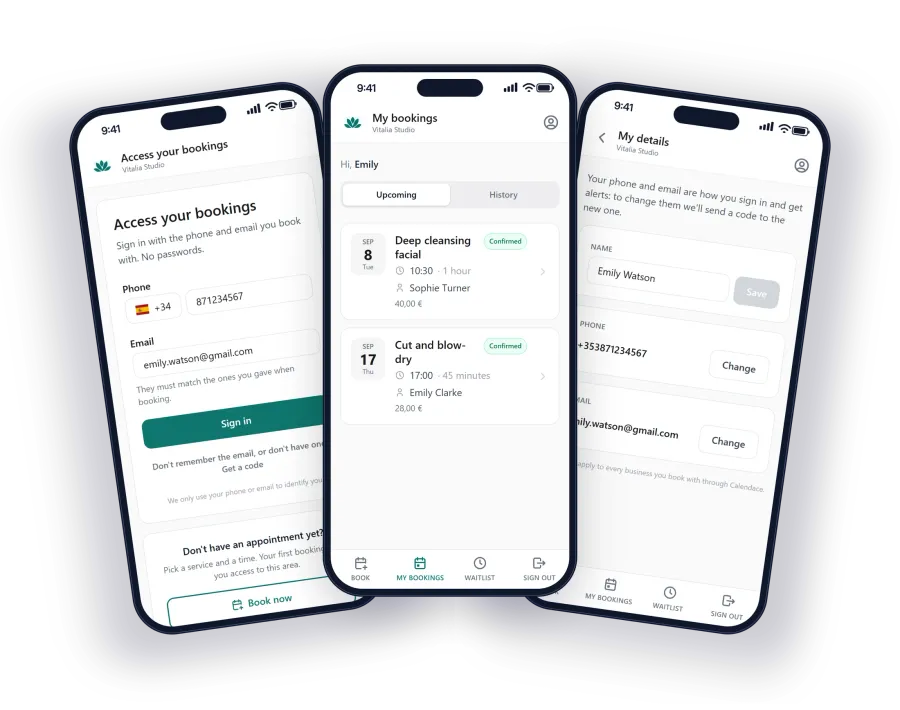
Your Calendace booking page can be installed as an app on the client’s phone, from the browser, without going through any app store. It appears on the home screen with the name and icon you have chosen (on paid plans, your own icon and colour), and messages arrive as notifications from that app.
For a psychology practice this has two advantages no other channel offers:
- The notification comes from “Martha”, not from a phone number. The client signs in to their area with phone and email, no password, sees their upcoming appointments and cancels or changes from there. None of this goes through their WhatsApp or their inbox.
- It costs nothing. App notifications are free and unlimited, on every plan. For clients who come every week for months, it’s by far the cheapest channel.
The sensible approach is to offer it in the first session to any client who wants privacy, and keep email or WhatsApp for those who would rather not install anything.
The cancellation deadline is part of the frame
In therapy, the frame is what gives the work its shape: the day, the time, the length, the fee and what happens if the client doesn’t come. A well-made reminder is one more piece of that frame, and so is the cancellation deadline.
Say it from the start and put it in the confirmation message: “Sessions can be cancelled or changed up to 24 hours in advance”. From then on, the link in the reminder allows cancelling only within that deadline; if the client opens it too late, cancellation is no longer available and they have to talk to you. It isn’t an obstacle: it’s the rule you agreed, applied the same way for everyone, without you having to play gatekeeper.
With the confirmation, the reminder and the deadline running on their own, what’s left for the conversation is what matters: why the client has missed two Thursdays in a row, not whether they knew they had an appointment.
What it looks like in practice
A solo practice with 30 clients a week, set up for discretion:
- Business name: your name. Service: “50-minute session”. No descriptions in the titles.
- Confirmation by email, with the address and the 24-hour cancellation deadline.
- Reminder the day before, through the channel each client chose: app notification for those who have it installed, email or WhatsApp for the rest.
- Review request switched off. Nobody wants to be asked for a public review of their therapy.
That’s all. If you are unsure how to lay out your calendar, on our page for psychologists we explain how other practices set it up, and the WhatsApp versus SMS comparison helps you decide which channel to offer to anyone who doesn’t want the app.